YO2CR
-.-- --- ..--- -.-. .-.

YO2CR ProiecteYO2CR Projects

Programe și aparate făcute în shack-ul meu, pentru stația mea, și date mai departe radioamatorilor care vor să le folosească.

Software and gadgets built in my own shack, for my own station, and shared with any radio amateur who wants to use them.

Liviu Robert Corseanschi Lupeni · KN15OI Yaesu FTDX-10 CW · SSB · FT8

ProiecteProjects

Trei sunt gata de descărcat. Ceasul de stație merge în stația mea și e încă în lucru.

Three are ready to download. The station clock runs in my station and is still in progress.

YO2CR CW 2.7

YO2CR CW 2.7 gata de descărcatready to download

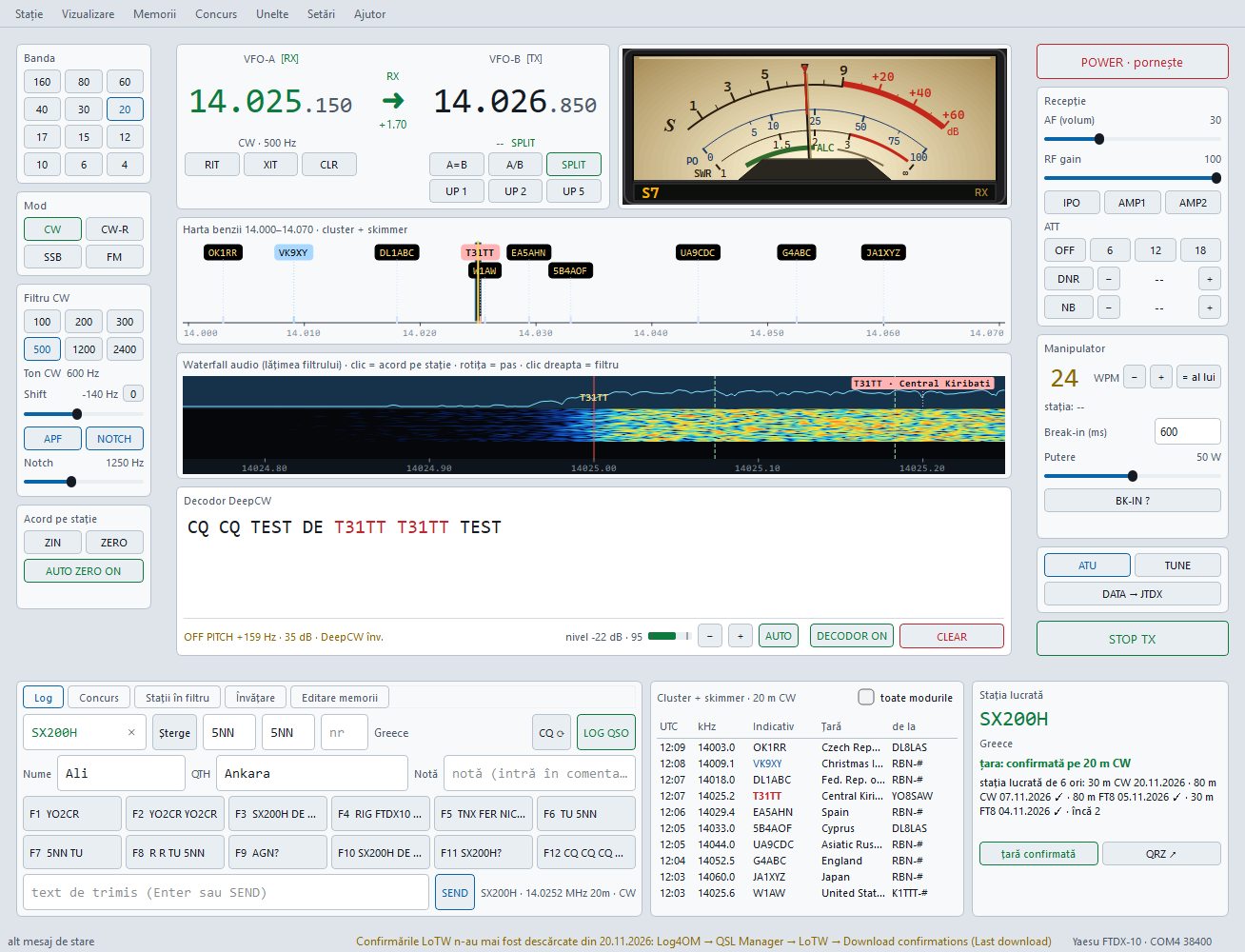
Program de telegrafie pentru Windows, cu decodor neural, cluster și log.

A CW program for Windows, with a neural decoder, cluster and log.

  • Decodor DeepCW (rețea neurală): citește CW-ul și când semnalul e slab sau manipularea e de mână.
  • Comandă stația prin CAT (Hamlib inclus): VFO A/B, split, filtre, RIT/XIT, ATT, NB, DNR, APF, NOTCH, ATU.
  • Moduri CW, CW-R, SSB, FM și DATA, cu JTDX, JTDX_contest sau WSJT-X la alegere.
  • Cluster filtrat după modul în care ești, cu hartă a benzii și cascadă audio. Un clic pe spot și split-ul se pune singur.
  • Memorii F1–F12, log ADIF, trimitere în Log4OM, mod concurs, QRZ.
  • Îți arată dacă țara e nouă, neconfirmată sau confirmată, și te anunță când n-ai mai descărcat confirmările LoTW.
  • Nou în 2.7: decodor DeepCW îmbunătățit, antrenat de YO2CR pe semnale reale de bandă: în teste, cu o treime mai puține litere greșite (de la 44% la 29%) și de 3–4 ori mai puține pe semnale bune; găsește mai multe indicative. Cu acordul tău, programul poate trimite automat, anonim, exemple care îl fac și mai bun.
  • Din 2.5: CW prin CAT pentru stațiile cu un singur port USB (Icom IC-7300, IC-705, IC-9700): nu mai trebuie al doilea port.
  • Din 2.4: meniuri și în engleză, găsește singur porturile stației (Yaesu), caută stația după nume (ex. „746 pro”), mesaje clare la CAT, decodor DeepCW reantrenat, cu mai puține greșeli.
  • Din 2.3: se actualizează singur (verifică o dată pe zi și instalează la un clic), banda cu textul transmis.
  • DeepCW decoder (neural network): reads CW even when the signal is weak or the keying is by hand.
  • Controls the radio over CAT (Hamlib included): VFO A/B, split, filters, RIT/XIT, ATT, NB, DNR, APF, NOTCH, ATU.
  • CW, CW-R, SSB, FM and DATA modes, with your choice of JTDX, JTDX_contest or WSJT-X.
  • Cluster filtered by your current mode, with a band map and audio waterfall. Click a spot and split is set for you.
  • F1–F12 memories, ADIF log, sending to Log4OM, contest mode, QRZ.
  • Shows whether a country is new, unconfirmed or confirmed, and reminds you when your LoTW confirmations are out of date.
  • New in 2.7: improved DeepCW decoder, trained by YO2CR on real band signals: in tests about a third fewer wrong letters (from 44% to 29%) and 3–4 times fewer on good signals; finds more callsigns. With your consent the program can send anonymous examples automatically to make it even better.
  • Since 2.5: CW via CAT for radios with a single USB port (Icom IC-7300, IC-705, IC-9700): no second port needed.
  • Since 2.4: English menus, finds the radio's COM ports by itself (Yaesu), radio search by name (e.g. “746 pro”), clear CAT messages, retrained DeepCW decoder with fewer errors.
  • Since 2.3: updates itself (checks once a day, installs with one click), a band showing the text being sent.
☕ Dacă îți plac programele, îmi poți oferi o cafeaSupport my projects on Ko-fi

Kitul conține opțional JTDX_contest (licență GPL v3; autorii și sursa sunt în NOTITE-TERTI.txt). Cum îl instalezi →

The installer optionally includes JTDX_contest (GPL v3 licence; authors and source are listed in NOTITE-TERTI.txt). How to install →

Cerințe PC: Windows 10 / 11 pe 64 de biți; procesor Intel Core i3 / i5 / i7 (din cca. 2010) sau AMD (din 2011) – pe Celeron / Pentium / Core 2 mai vechi nu pornește; 4 GB RAM (recomandat 8 GB); cca. 1 GB pe disc; placa de sunet a stației și cablul CAT / USB. Dacă decodorul rămâne la „decodorul pornește…”, instalați Microsoft Visual C++ Redistributable x64.

PC requirements: Windows 10 / 11 64-bit; Intel Core i3 / i5 / i7 (about 2010 or newer) or AMD (2011 or newer) – it does not start on older Celeron / Pentium / Core 2; 4 GB RAM (8 GB recommended); about 1 GB of disk; the radio's sound card and the CAT / USB cable. If the decoder stays at „decodorul pornește…”, install Microsoft Visual C++ Redistributable x64.

În versiunea următoare: componenta Microsoft inclusă direct în kit, mesaj clar dacă procesorul e prea vechi sau decodorul nu poate porni, corecturi la vremea {WX} și la pornirea Log4OM, mesaje traduse complet în engleză și sfaturi noi în manual (QRP Labs QMX, PC KEYING la FTDX-10, Log4OM și JTDX).

Coming in the next version: the Microsoft component included in the kit, a clear message when the processor is too old or the decoder cannot start, fixes for the {WX} weather and the Log4OM start, all messages translated to English and new tips in the manual (QRP Labs QMX, FTDX-10 PC KEYING, Log4OM and JTDX).

De ce ai nevoie

What you need

  • Windows 10 sau 11, pe 64 de biți
  • o stație cu CAT suportat de Hamlib (Yaesu, Icom, Kenwood…)
  • sunetul stației intrat în PC (placa de sunet a stației sau o interfață)
  • ~1 GB loc pe disc
  • Windows 10 or 11, 64-bit
  • a radio with CAT supported by Hamlib (Yaesu, Icom, Kenwood…)
  • the radio's audio into the PC (the radio's USB sound card or an interface)
  • ~1 GB of disk space

Licență

Licence

Freeware: gratuit pentru radioamatori. Nu se vinde și nu se modifică.

Freeware: free for radio amateurs. Not to be sold or modified.

DX Live Panel – spots DX Live Panel – weather

DX Live Panel pe GitHubon GitHub

Un ecran tactil de 7" lângă stație: spoturi DX, ora UTC, propagare, vreme și alarme.

A 7" touch screen next to the radio: DX spots, UTC time, propagation, weather and alerts.

  • Merge pe placa Waveshare ESP32-S3-Touch-LCD-7, fără PC pornit.
  • Spoturi din cluster și RBN, filtrate pe țări lipsă, bandă sau mod.
  • Alarmă pentru țară nouă și pentru „confirmare posibilă” (stație LoTW încă neconfirmată), și pe telefon prin ntfy.
  • Atingi un spot și stația se acordă pe el (cu programul agent pe PC).
  • Vremea pe 7 zile și avertizările ANM pentru județul tău.
  • Se actualizează singur de pe internet.
  • Runs on the Waveshare ESP32-S3-Touch-LCD-7 board, no PC needed.
  • Cluster and RBN spots, filtered by missing countries, band or mode.
  • Alerts for a new country and for a "possible confirmation" (an unconfirmed LoTW user), also on your phone via ntfy.
  • Tap a spot and the radio tunes to it (with the agent program on the PC).
  • 7-day weather and official weather warnings.
  • Updates itself over the internet.
☕ Dacă îți plac programele, îmi poți oferi o cafeaSupport my projects on Ko-fi

Kitul și manualul (PDF, în engleză și română) sunt la ultima versiune de pe GitHub.

The kit and manual (PDF, English and Romanian) are in the latest GitHub release.

De ce ai nevoie

What you need

  • placa Waveshare ESP32-S3-Touch-LCD-7 (7", 800×480)
  • Wi-Fi în shack
  • opțional: cheie QRZ XML sau cont LoTW, pentru țările lucrate
  • Waveshare ESP32-S3-Touch-LCD-7 board (7", 800×480)
  • Wi-Fi in the shack
  • optional: a QRZ XML key or LoTW account, for worked countries

Panou Rotor YO2CR 2.1YO2CR Rotor Panel 2.1 gata de descărcatready to download

Un ecran tactil de 7" care comandă rotorul de antenă: atingi harta și antena se întoarce.

A 7" touch screen that drives your antenna rotator: tap the map and the antenna turns.

  • Hartă centrată pe locatorul tău; o atingere îndreaptă antena spre locul ales.
  • Butoane CW / CCW / STOP, SP / LP, direcția în grade și zone rapide.
  • Prin PC cu Hamlib rotctld: Yaesu G-450, G-650, G-800, G-1000, G-2800 (DXA / SDX / DXC) și partea de azimut a G-5500, cu interfață GS-232A/B sau GS-232. În principiu, orice rotor de azimut suportat de rotctld; gândit pentru rotoare cu 450°.
  • Mod cu relee comandate direct de ecran (MCP23017 + ADS1115): experimental, încă neprobat pe un rotor real.
  • Se încarcă din browser, fără instalare (esptool-js, la adresa 0x0).
  • Map centred on your locator; one tap points the antenna where you want.
  • CW / CCW / STOP, SP / LP, heading in degrees and quick zones.
  • Through a PC with Hamlib rotctld: Yaesu G-450, G-650, G-800, G-1000, G-2800 (DXA / SDX / DXC) and the azimuth part of the G-5500, with a GS-232A/B or GS-232 interface. In principle any azimuth rotator that rotctld supports; designed for 450° rotators.
  • Relays driven directly by the screen (MCP23017 + ADS1115): experimental, not yet tried on a real rotator.
  • Flashed from the browser, nothing to install (esptool-js, address 0x0).
☕ Dacă îți plac programele, îmi poți oferi o cafeaSupport my projects on Ko-fi

Probat pe 20.11.2026 pe ecranul real, cu rotctld și un rotor simulat Hamlib: legătura Wi-Fi, citirea poziției, mers la direcție, CW/CCW, STOP. Kitul conține firmware-ul, manualele, licența și scripturile pentru PC.

Tested on 20.11.2026 on the real display, with rotctld and a Hamlib simulated rotor: Wi-Fi link, position readout, go to heading, CW/CCW, STOP. The kit contains the firmware, manuals, licence and PC scripts.

De ce ai nevoie

What you need

  • placa Waveshare ESP32-S3-Touch-LCD-7 (7", 800×480)
  • un PC cu Hamlib rotctld (Hamlib se instalează separat) și interfața rotorului
  • Wi-Fi în shack
  • textele de pe ecran sunt în română
  • Waveshare ESP32-S3-Touch-LCD-7 board (7", 800×480)
  • a PC with Hamlib rotctld (Hamlib is installed separately) and your rotator interface
  • Wi-Fi in the shack
  • the on-screen texts are in Romanian

Licență

Licence

Freeware: gratuit pentru radioamatori. Nu se vinde și nu se modifică.

Freeware: free for radio amateurs. Not to be sold or modified.

Ceas de stație FTDX-10FTDX-10 station clock în lucruin progress

Un ecran mic WT32-SC01 lângă stație, care ține banda în pas pe toată linia.

A small WT32-SC01 screen next to the radio that keeps the whole chain on the right band.

  • La schimbarea benzii pe FTDX-10: anunță amplificatorul Xiegu GPA100 prin Bluetooth și trimite acordul L/C tunerului ATR-1000 prin Wi-Fi, fără purtătoare de acord.
  • Ora UTC și locală, frecvența și modul, puterea și SWR-ul în emisie.
  • Propagare, soarele la locatorul tău și QSO-urile zilei.
  • On a band change on the FTDX-10, it tells the Xiegu GPA100 amplifier over Bluetooth and sends the L/C tune to the ATR-1000 tuner over Wi-Fi, with no tuning carrier.
  • UTC and local time, frequency and mode, power and SWR on transmit.
  • Propagation, sunrise/sunset at your locator and today's QSOs.

Făcut pentru combinația mea FTDX-10 + GPA100 + ATR-1000. Dacă ai aceeași stație și te interesează, scrie-mi.

Built for my FTDX-10 + GPA100 + ATR-1000 setup. If you have the same station and are interested, write to me.

Instalarea YO2CR CWInstalling YO2CR CW

Kitul nu e semnat digital (semnătura costă anual). De aceea Windows arată la prima pornire un ecran albastru „Windows a protejat PC-ul”. E normal.

The installer is not digitally signed (a signature costs money every year). So on first run Windows shows a blue "Windows protected your PC" screen. That is normal.

Descarcă și deschide kitulDownload and open the installer

Dublu clic pe YO2CR_CW_Setup_2.7.exe.

Double-click YO2CR_CW_Setup_2.7.exe.

Apasă „Mai multe informații”Click "More info"
Windows a protejat PC-ulMicrosoft Defender SmartScreen a împiedicat pornirea unei aplicații nerecunoscute…
Mai multe informații
Windows protected your PCMicrosoft Defender SmartScreen prevented an unrecognized app from starting…
More info
Apoi „Rulează oricum”Then "Run anyway"
Aplicație: YO2CR_CW_Setup_2.7.exe
Editor: Editor necunoscut
Rulează oricum
App: YO2CR_CW_Setup_2.7.exe
Publisher: Unknown publisher
Run anyway

Amprenta SHA-256 a kitului, ca să verifici că e cel original:
826ED1FD60048F3102E26AA7D011E2B1192D75F004F5EEAE08C77C9E22975EFA

SHA-256 of the installer, to check it is the original:
826ED1FD60048F3102E26AA7D011E2B1192D75F004F5EEAE08C77C9E22975EFA

La prima pornire programul îți cere indicativul, stația, portul COM și placa de sunet. Totul e explicat în manual.

On first start the program asks for your callsign, radio, COM port and sound card. Everything is explained in the manual.

Contact

Întrebări, rapoarte de erori sau doar un 73 — scrie-mi.

Questions, bug reports or just a 73 — drop me a line.